
How to make a character sheet
🎥 Making a whole movie? Follow Make your own movie - characters, places, script and filming, step by step.
🧸 What is a character sheet?
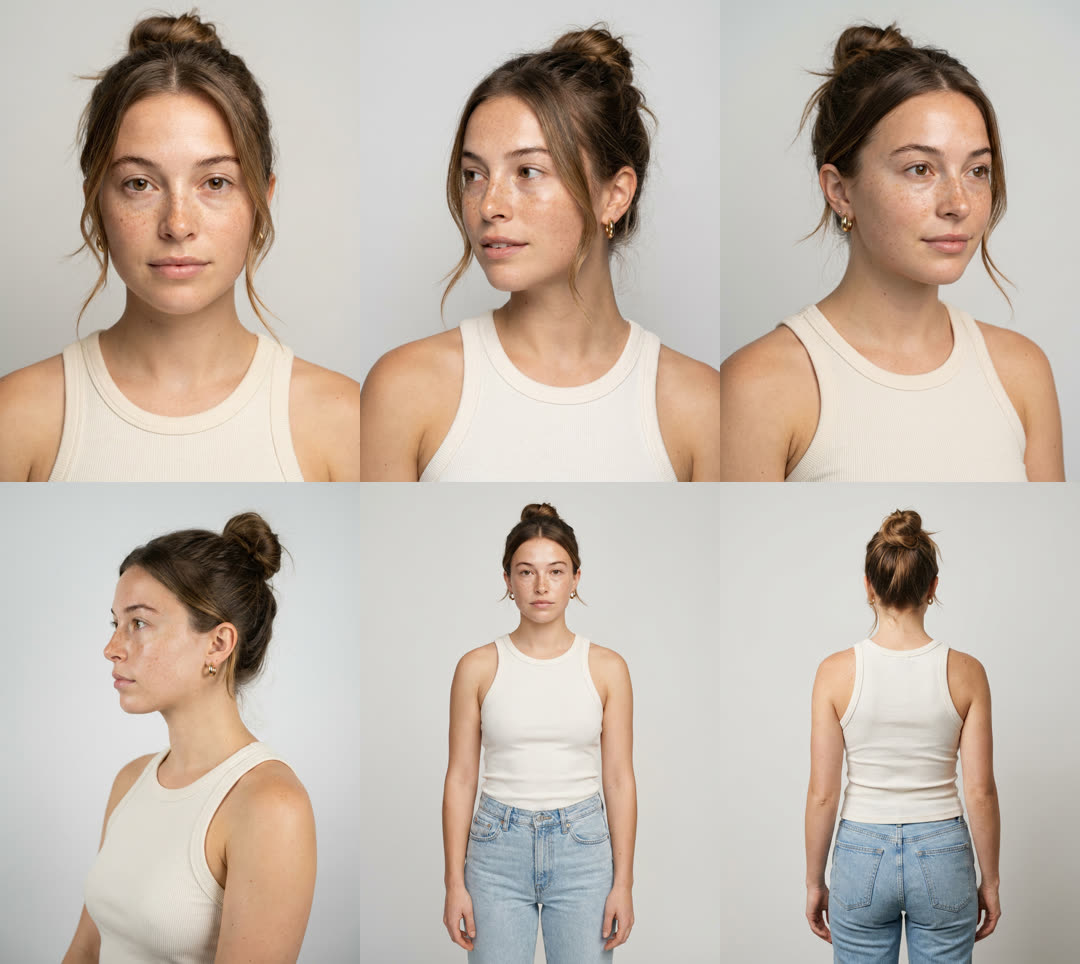
It's photos of the same person from every side - like turning a toy around in your hand to see its front, its sides and its back.
AI video models only know what they're shown. If they only see the front of a face, they guess the side - and the guess is often a different person. A character sheet shows them every side, so they don't have to guess.
📋 The 6 photos to make
Same clothes, same hair, same plain background and soft light in all of them. Add one extra smiling close-up if they talk or laugh in your film.
👀 A real example, made on Lucy
We gave Lucy one photo and tapped Make my character sheet. About a minute later: the same woman from six sides - same freckles, same bun, same earrings, same top.
Then we asked for a film in a sunny laneway cafe. Lucy put her inside the scene - new place, new light, new clothes layer - and she's still clearly the same person:
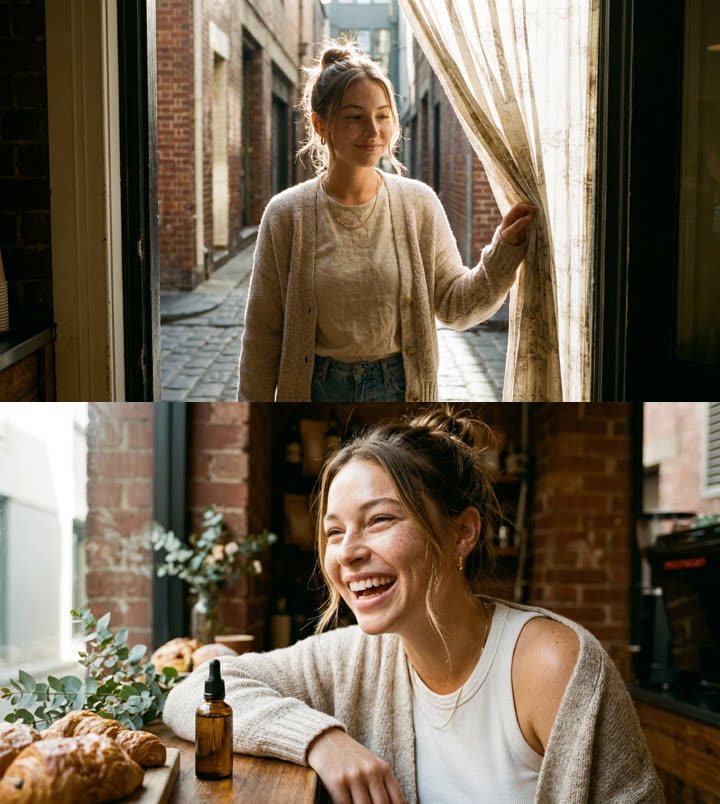
Lesson from this test: our starting photo came from an old video where she held a skincare bottle - and a small bottle popped up on the cafe table. Use photos with nothing in the hands and nothing you don't want in your film.
✨ Way 1 - the easiest: let Lucy make it (free)
- Open Directed by Lucy.
- In Character, tap + Add photos and pick one clear photo of the face (looking at the camera, bright, no sunglasses).
- Tap ✨ Make my character sheet. Wait about a minute while Lucy draws the 6 angles.
- Check every picture. Same person? Same hair? Same clothes? Tap the × on any that look wrong.
- Type a name (and, if you like, "age, look, style") and tap Save. Now they're in Your cast - tap them in any future film.
📱 Way 2 - a real person: take the photos with a phone
- Stand them in front of a plain wall, facing a window (daylight on their face, not behind them).
- No sunglasses, no hat, hair out of the face, nothing in their hands. Same clothes for every photo.
- Hold the phone at their eye height, about two big steps away.
- Take the 6 photos: face close-up → turn halfway left → turn halfway right → turn fully sideways → step back for full body → turn around for the back. They turn - you stay still.
- Upload them all into Character (up to 8) and save them to Your cast.
Only photograph people who've said yes.
🎨 Way 3 - a made-up person: copy-paste prompts
Use any image generator (ChatGPT, Gemini, or stills on Lucy). Replace the [brackets] with your own words.
Step 1 - make the face:
Create ONE photorealistic head-and-shoulders photo of a [age]-year-old [woman / man / person] with [skin tone], [hair colour and style], [eye colour] eyes and [one detail people would remember, e.g. freckles, a small scar, dimples]. They wear [simple clothes with colours, e.g. a navy crew-neck jumper]. Facing the camera straight on, relaxed neutral expression, plain light-grey background, soft even window light. Real skin texture with pores, sharp focus. One single photo - no collage, no text.
Step 2 - keep the face you like, then make each other angle one at a time, always attaching that first photo:
Using this photo, create ONE new photo of the exact same person - identical face, skin, hair, body and clothes. Framing: [pick one: head-and-shoulders turned three-quarters to their left / three-quarters to their right / side profile facing left / full body head to toe facing the camera / full body from behind]. Plain light-grey background, soft even light, nothing in their hands. Photorealistic. One single photo - no collage, no grid, no text.
Step 3 - upload all of them into Character. Or skip step 2: upload just the face and tap Make my character sheet.
Tip: make each angle as its own photo. One big image with all the angles on it works, but separate photos are clearer for the model.
📦 What goes in each box
| Box | How many | What to add |
|---|---|---|
| Character | up to 8 | The 6 angles above (+ a smile). Only one person. |
| Product | up to 3 | Front, a close-up of the label, the side. Plain background, no hands. |
| Location | up to 3 | The empty place - a wide shot plus other angles. No people in it. |
That's 14 photos at most - the most the model that draws your storyboard can look at at once. All of them are optional. No photos at all? Lucy invents the person and place from your idea and keeps them consistent herself.
🏠 Do I need a location photo?
Only if it must be a real place - your shop, your classroom, your street. Otherwise skip it and Lucy invents a location that fits your idea.
Either way, your character is never pasted on top. Lucy first draws one master picture of your character standing inside the place, in its own light - with shadows where they stand, the room's light on their hair and skin, the same camera blur as the background, and haze or rain passing in front of and behind them. Every storyboard frame is drawn from that picture, and every video shot starts from its frame. That's why it doesn't look like a green screen.
✅ Check your sheet before you film
- Is it the same face in every photo? (eyes, nose, freckles, marks)
- Same hair - colour, length, parting?
- Same clothes and colours?
- Hands and fingers look normal? Nothing strange in the background?
- Remove any photo that fails - fewer good photos beat more mixed ones.
🎯 More ways to keep them the same in every shot
- Save them to Your cast and reuse the same set every time.
- In the plan, keep the wardrobe line the same - Lucy writes it into every shot word for word.
- Check the storyboard. If one face drifts, redraw it: "make her face match shot 1". You get 5 redraws.
- Medium shots and close-ups hold a face best; very fast head turns and tiny faces in wide shots drift most.
- Use one model for the whole film - Lucy does this automatically.
📚 Further reading
How other creators build multi-angle sheets for AI video (outside links):
FAQ
- How many photos can I upload to Directed by Lucy?
- Up to 14 in total: 8 of your character, 3 of your product and 3 of your location. 14 is the most the image model that draws your storyboard can look at in one go, and Lucy shows it all of them for every frame.
- Do I need a character sheet?
- Only if a specific person must look the same in every shot - you, a presenter, a brand character. For a made-up person, Lucy keeps them consistent from her own description. One clear face photo is the minimum; a sheet (5-7 angles) makes the face hold up when the camera moves around them.
- More photos is always better, right?
- No - different angles help, near-duplicates don't. Six photos from six different angles beat eight almost-identical selfies. Never mix different people in the Character box.
- Why does my character not look like a green-screen cut-out?
- Before drawing any storyboard frame, Lucy draws one master still with your character standing inside the location, lit by that place's own light - with contact shadows, light spilling onto their edges, matching lens blur, and haze or rain passing in front of and behind them. Every frame is drawn from that still, and every video shot starts from its frame.
- Can I use a photo of someone else?
- Only with their permission. Never upload a person's face without their consent, and don't use photos of celebrities or public figures.
- Is the automatic character sheet free?
- Yes - tap “Make my character sheet” after adding one clear photo. Lucy draws six angles on a plain background. It's free for up to three sheets a day. Always check each angle looks like the same person and remove any that don't.